You will quickly realize that secrets stored in code, configuration files, or shared documents are one of the most common causes of cloud security incidents. Azure Key Vault (AKV) provides a secure, centralized environment for managing secrets, keys, and certificates. By enforcing strong access controls, network isolation, and auditing, Key Vault reduces the blast radius of potential exposures and ensures compliance with security standards.
This article explains why protecting secrets is critical, how to deploy Key Vault securely, best practices for secret lifecycle management, and advanced strategies for high-security environments. By the end, you will understand how to integrate Key Vault across applications, pipelines, and Azure services while maintaining strong governance, auditability, and Zero Trust principles.
Securing Secrets with Azure Key Vault
Secrets belong in a vault—not in source code, config files, or spreadsheets shared over email. Yet exposed credentials remain one of the leading causes of cloud security incidents. Attackers routinely scan public repositories, leaked configuration files, and misconfigured storage accounts looking for anything to exploit.
Azure Key Vault is purpose-built to solve this problem. It provides secure, centralized storage for keys, secrets, and certificates, while enforcing access control, network restrictions, and auditing. By separating secrets from code and configuration, Key Vault significantly reduces the risk of compromise.
Why Securing Secrets Matters
Hardcoding secrets or storing them in plain text is a recipe for compromise. Once leaked, attackers can move faster than organizations can respond.
Key Vault mitigates these risks with:
- Centralized secrets management, eliminating credential sprawl
- Fine-grained access control using Azure RBAC and managed identities
- Hardware-backed protection using Managed HSM (premium SKU)
- Native integration with Azure services, applications, and DevOps pipelines
By separating secrets from applications and enforcing strong controls, Key Vault reduces the potential blast radius of a breach.
Humour Check! Why did the secret go to the vault?
Because it needed a safe space.
And that’s exactly what Key Vault provides: a secure, monitored, and auditable environment for sensitive information.
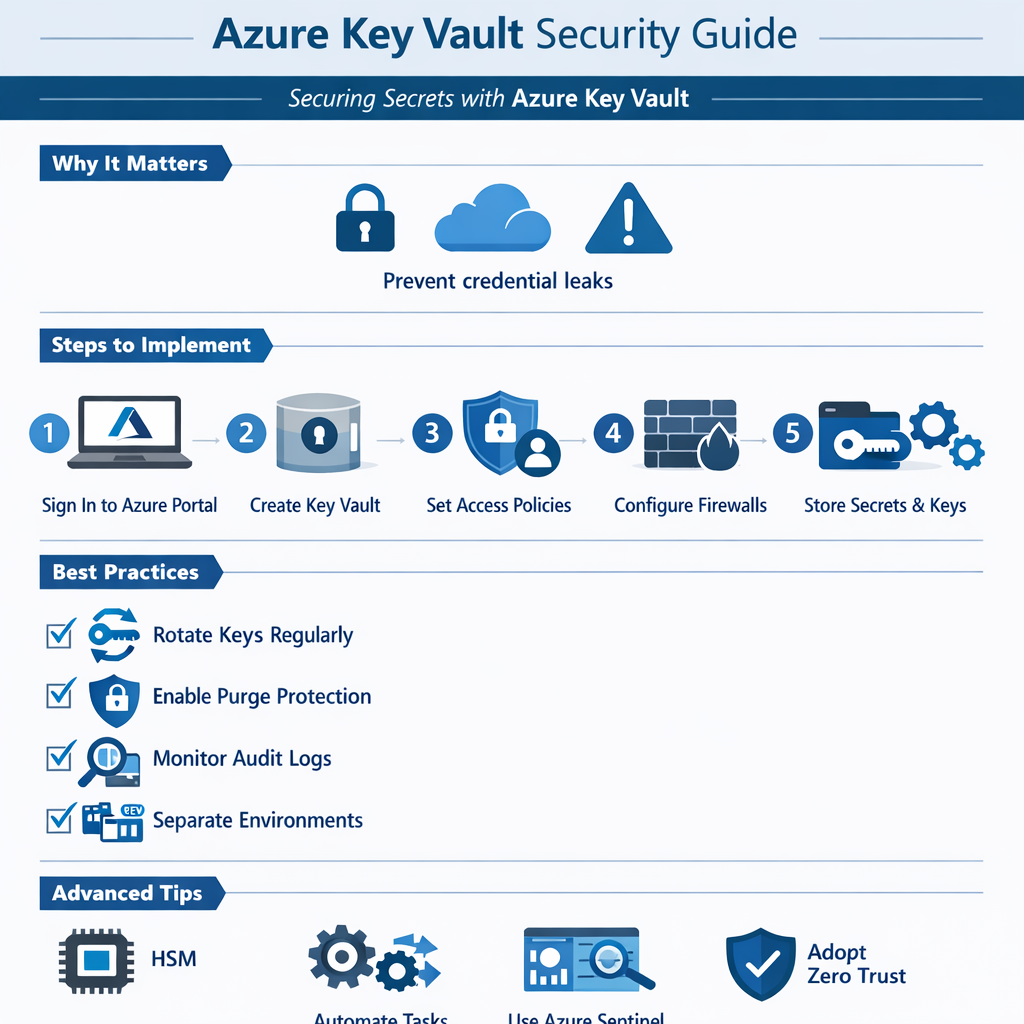
How to Use Azure Key Vault (Step by Step)
Implementing Azure Key Vault is straightforward, and this guide incorporates both standard deployment and best practices for locking down access from the internet.
1. Sign in to the Azure Portal
Navigate to the Key Vault service.
2. Create a New Vault
- Choose a unique name
- Select a region close to your applications
- Select the appropriate pricing tier based on security requirements
3. Configure Access Control
- Use Azure RBAC for fine-grained permissions
- Assign access to users, applications, and managed identities
- Apply least privilege principles, granting only the access necessary for each identity
4. Lock Down Network Access
- Enable Azure Private Link to connect your Key Vault to a private endpoint in your virtual network. This keeps traffic off the public internet.
- Enable the Key Vault firewall and restrict access to approved IP ranges or subnets.
- Disable public network access entirely if possible; allow only “trusted Microsoft services” when required.
- Even with network restrictions, RBAC ensures only authorized identities can access secrets.
5. Store Secrets Securely
- Add secrets, keys, and certificates
- Enable diagnostic logging for access monitoring
- Apply naming conventions for easier management
6. Integrate with Applications
- Use Managed Identities to eliminate stored credentials
- Reference secrets securely from applications and services
- Integrate with Azure DevOps or CI/CD pipelines without exposing values
Best Practices for Key Vault Security
To maximize protection and reduce operational risk:
- Rotate secrets and keys regularly
- Enable soft delete and purge protection
- Monitor access logs and set alerts for unusual activity
- Limit vault access to only what is necessary
- Use separate vaults for different environments (dev, test, prod)
- Implement least privilege access for both users and applications
- Regularly review and remove stale or unused secrets and keys
- Tag vaults and secrets for easier tracking and lifecycle management
- Enable logging and alerting with Azure Monitor and Microsoft Sentinel
- Test access policies periodically to ensure they behave as expected
Advanced Tips for Mature Environments
For organizations with higher security requirements:
- Store certificates for TLS or application authentication.
- Integrate Key Vault events with Microsoft Sentinel for centralized monitoring.
- Use Managed HSM for hardware-backed cryptographic protection.
- Automate secret rotation and lifecycle management with Azure Automation or Functions.
- Combine network controls and identity access to enforce Zero Trust principles.
Closing Thoughts
Azure Key Vault is foundational for secure cloud architectures. Centralized secrets management, strong access controls, network lockdown, and auditing make Key Vault a critical step in protecting sensitive information.
Implement Key Vault early, integrate it with all apps and pipelines, and secure it from public access. Doing so ensures secrets remain safe, auditable, and compliant, reducing operational risk and enforcing strong cloud security practices.