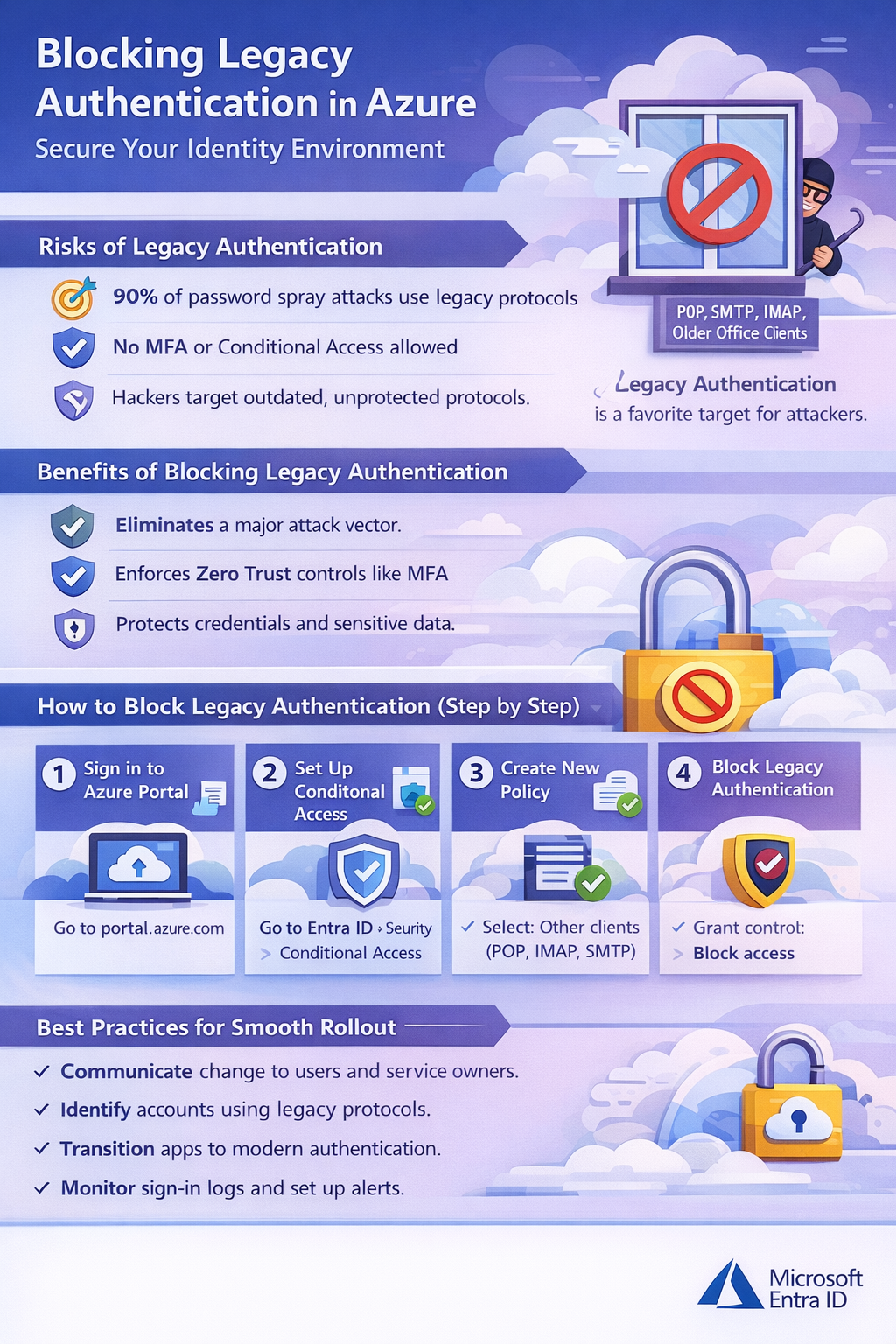
You will often hear about identity breaches, password sprays, and phishing attacks — and yet, the most overlooked attack vector remains legacy authentication. Protocols like POP, IMAP, SMTP, and older Office clients were designed decades ago, long before modern identity threats existed. They cannot enforce Multi-Factor Authentication (MFA) or Conditional Access, making them a persistent “side door” for attackers.
This article explains why blocking legacy authentication is one of the highest-impact security controls in Microsoft Entra ID (formerly Azure Active Directory). You will learn how attackers exploit these outdated protocols, why they remain a favorite target for password-based attacks, and how Conditional Access can eliminate this risk without disrupting legitimate access.
By the end, you will understand how to implement a secure, Zero Trust-aligned policy that closes this attack vector, protects credentials, and strengthens your organization’s overall security posture — all while avoiding unintended disruptions for users and critical services.
Legacy authentication protocols are the equivalent of leaving a window open on the 50th floor of a skyscraper. They might not seem like a big deal—until someone climbs in. Designed long before modern identity threats existed, these protocols lack the protections we now consider table stakes, such as multi-factor authentication (MFA) and Conditional Access.
If your organization is serious about Zero Trust, blocking legacy authentication isn’t a “nice to have.” It’s a foundational security control.
Why Legacy Authentication Is a Serious Risk
Protocols like POP, IMAP, SMTP, and older Office clients were built decades ago when usernames and passwords were considered sufficient protection. Today, they represent one of the most reliable entry points for attackers.
Legacy authentication relies solely on basic credentials and cannot enforce MFA. That means even if your users are protected by strong MFA policies elsewhere, these protocols act as an open side door—one that attackers actively target.
Microsoft has reported that over 99% of password spray attacks leverage legacy authentication protocols. Attackers don’t need sophisticated exploits when they can simply brute-force weak or reused passwords against services that never ask for a second factor.
And here’s the uncomfortable truth:
Legacy protocols are rarely used intentionally—but they’re almost always abused deliberately.

A Light-Hearted Reality Check
Why don’t legacy authentication protocols ever get invited to security parties?
Because they can’t handle modern authentication.
Jokes aside, that’s exactly the problem. In a world of MFA, device compliance, and risk-based access decisions, legacy protocols simply don’t belong. They can’t participate in modern security conversations—and that makes them a liability.
How to Block Legacy Authentication in Azure (Step by Step)
Blocking legacy authentication is one of the fastest, highest-impact security improvements you can make in Azure.
SMTP Auth can be tricky. Microsoft now distinguishes:
- Authenticated SMTP for sending mail (used by apps, not interactive login)
- Blocking SMTP Auth can break legitimate workflows like email sending from applications or printers.
Here’s how to block legacy auth using Conditional Access:
1. Sign in to the Azure Portal
- Go to: https://portal.azure.com
2. Navigate to Conditional Access
- Select Microsoft Entra ID
- Go to Security → Conditional Access
3. Create a New Policy
- Click New policy
- Name it: Block Legacy Authentication
4. Configure Assignments
- Users and Groups:
- Select All users
- (Exclude break-glass or emergency access accounts)
- Cloud Apps:
- Select All cloud apps
5. Network
- Select Configure > Yes
- Selected Networks & Locations
- Choose your IP address for the printer or other legacy device as required.
- If there are no Networks (sites) to choose from then ensure you go to Entra Admin Portal > Conditional Access > Named Locations and create an IP Range definition.
6. Set Conditions
- Under Client apps, choose:
- Other clients (legacy authentication protocols)
7. Grant Controls
- Select Block access
8. Enable the Policy
- Start in Report-only mode or test with a pilot group
- Review results before enforcing globally
Best Practices for a Smooth Rollout
Blocking legacy authentication is technically simple—but operationally, it still deserves care:
- Communicate early with users and service owners before enforcement
- Identify service accounts that may rely on legacy protocols
- Transition applications to modern authentication (OAuth 2.0 or app-based auth) and it is an Important note that Legacy auth must be explicitly disabled even if clients support modern auth, because the old protocols are still accessible.
- Exclude emergency access accounts from Conditional Access policies
A short validation period can prevent unnecessary disruption while still closing a major security gap.
Advanced Tips for Security Teams
If you want to go further:
- Review Azure AD Sign-in Logs to identify legacy protocol usage before blocking
- Microsoft recommends monitoring for at least 2-4 weeks before full block to identify apps or scripts that depend on legacy auth
- Create alerts for legacy authentication attempts
- Pair this policy with MFA enforcement for interactive sign-ins
- Audit SMTP usage, especially for applications sending mail
Many organizations discover forgotten apps or scripts during this process—which is exactly the visibility Zero Trust is meant to provide.
Closing Thoughts
Blocking legacy authentication is one of the highest return-on-investment security controls available in Azure. It’s quick to implement, aligns perfectly with Zero Trust principles, and eliminates an attack vector responsible for the vast majority of credential-based attacks.
If legacy authentication is still enabled in your tenant, attackers aren’t asking if they should use it—they already are.