Microsoft Sentinel Baseline Deployment
A Practical, Microsoft-Aligned Walkthrough Series
Part 4 of 3. That’s Right – It’s a Bonus Automation Post for June!
Miss Part 1? Check it out here.
Miss Part 2? Check it out here.
Curious about Part 3? Check it out here.
Building Automation for Microsoft Sentinel Foundations
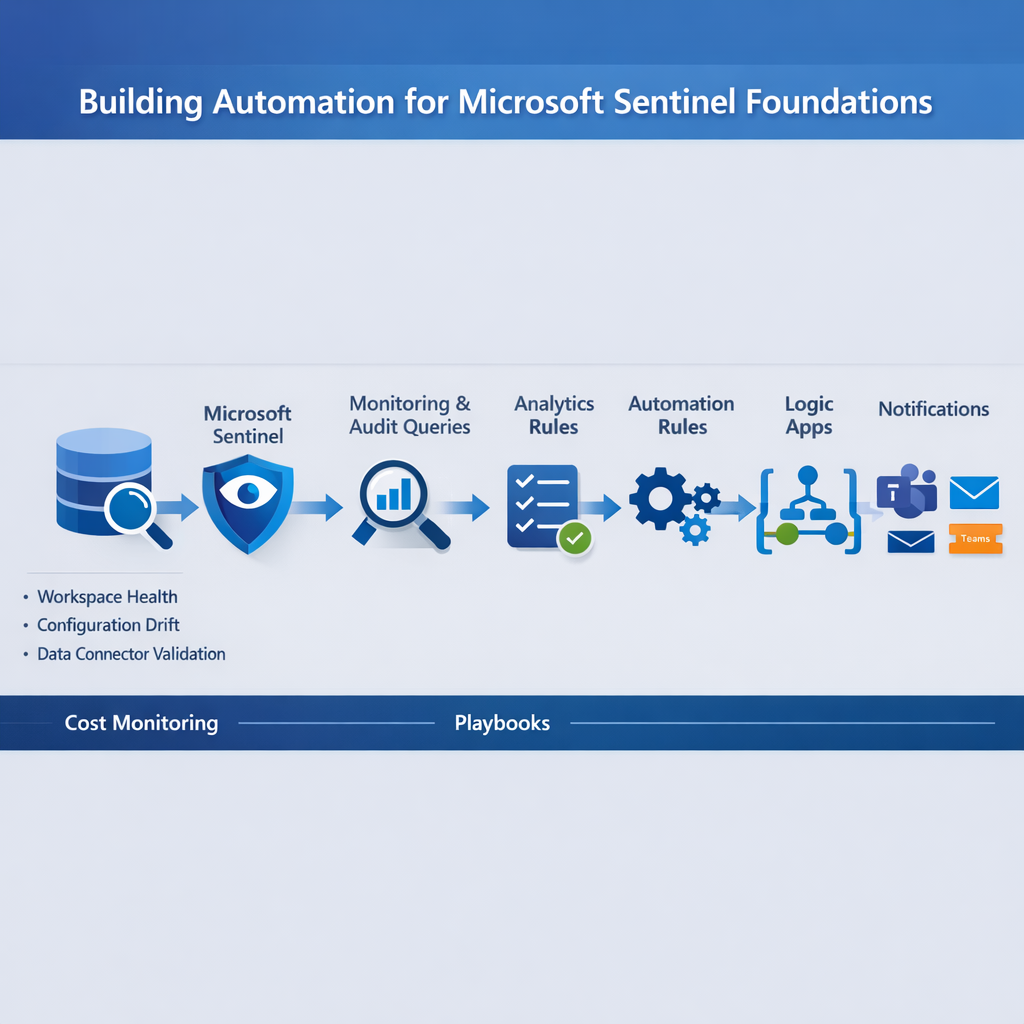
Microsoft Sentinel is powerful—but it can’t manage itself. Manual operations like onboarding data connectors, validating ingestion, monitoring workspace health, and auditing configuration changes quickly become a burden.
This mini-series bonus article walks through building automation around your Sentinel foundations, so you can:
- Keep your workspaces healthy
- Ensure configuration compliance
- Alert on critical changes
- Free SOC engineers for higher-value tasks
We’ll focus on safe, production-ready automations using Logic Apps, Sentinel automation rules, and KQL queries. Remember that Security Copilot is also ready for prime-time now too! Your E5/E7 (Let’s not talk about the license Tiers too much here…) enabled organization has access to the awesomeness of Copilot through your license now, and you can schedule prompts, automate response even easier now. One thing that has been a great development is creating agents from within Security Copilot to nest automations and build even better, job-specific Copilot Agents.
Automation Architecture (Diagram)
It’s make your own image day today! Try prompting your favourite LLM with this:
flowchart LR
LAW[Log Analytics Workspace] –> Sentinel[Microsoft Sentinel]
Sentinel –> Monitoring[Workspace Health Queries]
Sentinel –> Audit[Audit & Configuration Queries]
Monitoring –> AlertRules[Analytics Rules]
Audit –> AlertRules
AlertRules –> AutomationRules[Automation Rules]
AutomationRules –> LogicApps[Logic Apps / Playbooks]
LogicApps –> Notifications[Teams / Email / Ticketing]
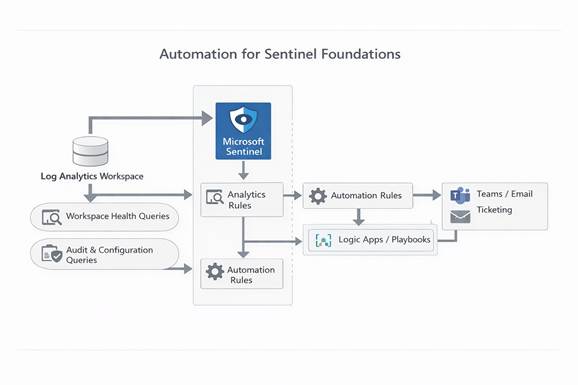
- Law / Sentinel – The foundation layer
- Monitoring & Audit – Queries that validate workspace and configuration health
- Automation Rules + Logic Apps – Triggered responses and notifications
Step 1 – Automate Workspace Health Monitoring
Goal
Automatically track ingestion volume, latency, and errors across all connected data sources.
Example KQL Query
Usage
| summarize DailyIngestionGB = sum(Quantity)/1024 by bin(TimeGenerated, 1d)
| extend Alert = iff(DailyIngestionGB > 100, “High ingestion volume”, “Normal”)
Automation Action
- Create a Sentinel Analytics Rule with the query
- Set severity Medium
- Trigger an Automation Rule to send a Teams or email notification when ingestion exceeds thresholds
Benefit: Prevents surprise cost spikes and ensures your SOC can respond proactively.
Step 2 – Automate Configuration Drift Detection
Goal
Detect unauthorized or unexpected changes in Sentinel configuration, like rules edits or workspace settings updates.
Example KQL Query
SentinelAuditLogs
| where TimeGenerated > ago(7d)
| where OperationName has_any(“Create”, “Update”, “Delete”)
| summarize Changes=count(), FirstSeen=min(TimeGenerated), LastSeen=max(TimeGenerated) by OperationName, Actor, ResourceId
| order by LastSeen desc
Automation Action
- Trigger Logic App to alert SOC and log changes to a central compliance storage
- Optional: create a ticket in your ITSM system
Benefit: Maintains governance and aligns with Microsoft Sentinel best practices for operational integrity.
Step 3 – Automate Data Connector Validation
Goal
Ensure all expected data sources are healthy and ingesting correctly.
Example KQL Query
Heartbeat
| summarize LastReport = max(TimeGenerated) by Computer
| where LastReport < ago(24h)
Automation Action
- Send automated alerts if any critical data source misses a heartbeat
- Optionally, trigger a Logic App to run self-healing scripts or retry ingestion
Benefit: Reduces blind spots in your data foundation.
Step 4 – Automate Cost Monitoring
Goal
Prevent runaway ingestion costs or retention misconfigurations.
Example KQL Query
Usage
| summarize DailyIngestionGB=sum(Quantity)/1024 by bin(TimeGenerated, 1d)
| extend Cost = DailyIngestionGB * 2 // Example: $2/GB for estimation
| where Cost > 100
Automation Action
- Trigger Logic App to notify finance or security teams
- Create dashboard alerts in Sentinel
Benefit: Maintains cost awareness while keeping SOC focused on security, not invoices.
Step 5 – Combine Automation into Playbooks
- Build a centralized Logic App to handle:
- Notifications (Teams, email, ticketing)
- Remediation actions (e.g., restart failed connectors, reapply retention settings)
- Documentation and logging for compliance audits
- Tie all analytics rules to this foundation automation playbook
Benefit: One playbook manages multiple foundational checks, reducing SOC complexity.
Step 6 – Test in a Sandbox Environment First
Always deploy your automation in a test workspace before production.
This ensures alerts, notifications, and remediation actions run safely without impacting live environments.
- Use a dedicated test workspace
- Validate all Logic Apps, thresholds, and triggers
- Promote to production only after testing
Step 7 – Continuous Improvement
- Review automation outputs weekly: alert trends, false positives, missed detections
- Tune thresholds and update KQL queries as new best practices or data sources are onboarded
- Integrate Microsoft Sentinel content updates to ensure your automation rules stay aligned with new analytics rules
Benefits of Sentinel Foundation Automation
- Proactive Workspace Health – Alerts before ingestion or retention issues impact operations
- Operational Governance – Tracks all configuration changes automatically
- Cost Control – Avoids surprise bills with automated ingestion and retention monitoring
- SOC Efficiency – Analysts spend more time hunting and investigating real threats
- Compliance Readiness – Automated auditing ensures you can prove platform integrity
Enjoy your summer everyone & remember to check in on your Security Team regularly!