Security logging is only useful when the right data lands in the right place at a cost the organization can sustain. Noisy logs can hide real signals, inflate ingestion, and make analysts distrust the workspace.
In this walkthrough, we build a controlled Data Collection Rule transformation, test the KQL logic, validate the resulting records in Log Analytics, and document the cost behavior before applying the change more broadly. The focus is not blind filtering; it is intentional data shaping for security operations.
Goal:
Use Azure Monitor Data Collection Rule transformations to filter or shape noisy logs before ingestion while preserving useful security evidence.
Secondary Goal:
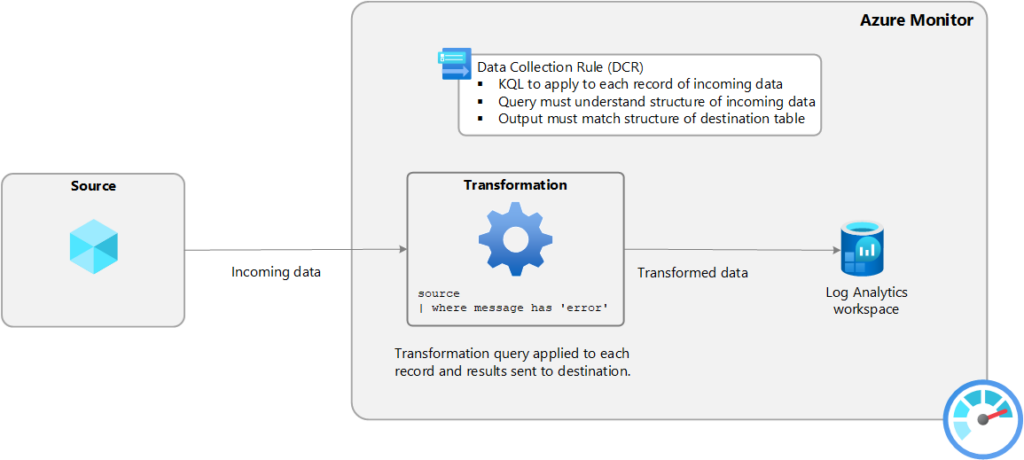
Remove mystery around DCR Transformations with log ingestion and surrounding technologies.
Why build this
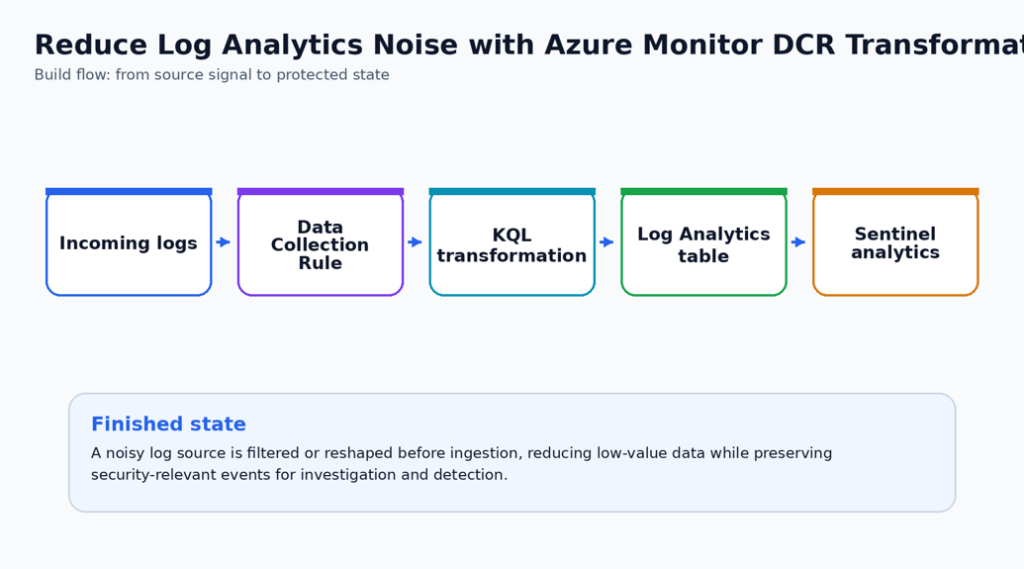
DCR transformations help when the incoming stream contains fields or records that are not useful for detection, investigation, or compliance. Because transformations happen before data is stored, mistakes can remove evidence permanently, so validation matters.
The right workflow is to measure the current volume, test the transformation logic with sample records, deploy narrowly, and compare before and after ingestion before scaling out.
Security Outcomes
- Noisy records are reduced or shaped before they become long-term Log Analytics data.
- The security team keeps the fields needed for detection and investigation instead of filtering aggressively without evidence.
- Cost impact is reviewed using Microsoft transformation billing guidance before production expansion.
What you will Deploy or Configure
- A scoped DCR transformation design.
- A sample KQL transformation that keeps security-useful records.
- Before and after ingestion review.
- Cost and detection-risk guardrails.
| Microsoft baseline: Transformations run before data is sent to the destination table and must preserve the destination schema. Filter only data that has no security, compliance, or troubleshooting value. |
| Special Highlight: Create a detection owner sign-off step before filtering more than routine noise. A transformation that saves money but removes evidence can weaken incident response. |
Prerequisites
- A Log Analytics workspace and a data source that supports transformations.
- Current ingestion baseline by table and source.
- A detection owner who can approve filtered records.
- A test workspace or lab DCR before production.
Before-state checklist
Capture the before state first. This creates documentation that you and administrators can use to determine what has been changed, and helps with Change Approval Board (CAB) requests when you or your team are ready to move changes to production.
- Record the current plan, policy, connector, rule, identity, or workspace setting before making changes.
- Capture current access behavior or alert visibility so the final validation has a clear before/after comparison.
- Confirm the owner for the resource and the person who can approve rollback if the pilot exposes a dependency.
- Check whether existing logs, alerts, or recommendations already exist so the article does not confuse old data with new validation evidence.
Lab build
Choose one noisy data stream and one supported table. Build the transformation against representative sample data, deploy it to a pilot DCR, and compare ingested records before and after the change.
In a perfect world this lab build would be completed using your testing instance, tenant, or subscription.
- Identify the noisy table and confirm it supports transformations. Do not assume every Azure table supports DCR transformations.
- What tables support DCR transformations? https://learn.microsoft.com/en-us/azure/azure-monitor/logs/tables-feature-support
- Build a before-query that summarizes volume by computer, provider, event ID, or category. Keep the top noise sources visible.
- Create a candidate KQL transformation that filters repetitive success or heartbeat-style records but preserves failures, security events, and admin activity.
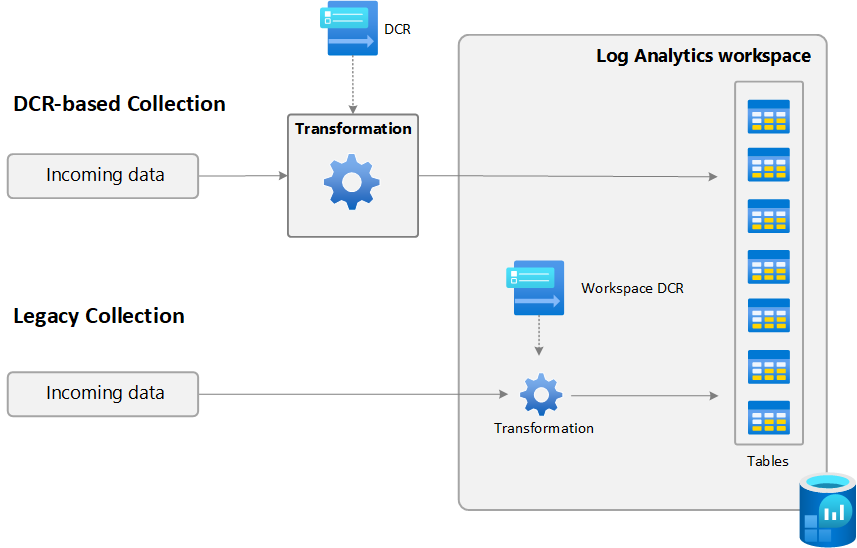
- Apply the transformation in a test DCR or workspace transformation DCR depending on the collection path. Remember that AMA-collected data uses its associated DCR.
- Not sure where to start for creating your DCR?
https://learn.microsoft.com/en-us/azure/azure-monitor/data-collection/data-collection-transformations
- Not sure where to start for creating your DCR?
- Validate schema compatibility. The output columns must match the destination table.
- Run the transformation for a pilot window and compare ingestion volume, detection behavior, and troubleshooting value.
- Promote to production only after documenting what was filtered and how to temporarily disable the transformation.
Change-window notes
- Schedule the pilot when a resource owner can validate application behavior immediately after the change.
- Keep the first production change intentionally narrow. A smaller but verified rollout is better than a broad rollout with uncertain impact.
- Do not remove the old control path until the new validation evidence is captured and reviewed.
- For controls that can affect traffic flow, authentication, backup retention, or alert volume, pre-stage the rollback steps in the change ticket.
Use the following block as a starting point for validation or implementation. Replace names, scopes, and resource identifiers before using it in production.
// Example pattern: keep errors and security-relevant events, drop routine informational noisesource
| where SeverityLevel >= 2 or Message has_any ("fail", "denied", "unauthorized", "malware", "blocked")
// Before/after volume review
Usage
| where TimeGenerated > ago(7d)
| summarize GB=sum(Quantity) / 1024 by DataType, bin(TimeGenerated, 1d)
| order by TimeGenerated descProduction hardening
For production, transformation changes should be reviewed like detection-rule changes. Keep the original query, the reason for filtering, the expected reduction, and a rollback copy in source control.
- Treat this control as part of the normal security operations backlog, not as a one-time portal configuration. Assign a named owner and review cadence before wider rollout.
- Use tags or a documented inventory to identify owner, environment, data sensitivity, and business criticality before expanding beyond the pilot.
- Separate deployment permission from approval permission. Security controls are stronger when one identity cannot both weaken and approve the control.
- Send logs, alerts, or audit evidence to the existing SOC workflow instead of creating a new place that nobody checks.
- Create an exception process with owner, expiry date, business justification, and compensating controls.
- Add the configuration to your normal change-management and monthly control-review process.
Operational handoff
- Add the new control to the monthly security review or platform operations checklist.
- Record the expected alert owner, escalation path, and response time for findings created by the control.
- Store the validation query, screenshot checklist, and rollback notes with the service runbook.
- Review exceptions quarterly and remove any exception that no longer has a business owner or expiry date.
[Screenshot placeholder: Add a screenshot of the transformed records or reduced volume after the pilot is active.]
Finished-state validation
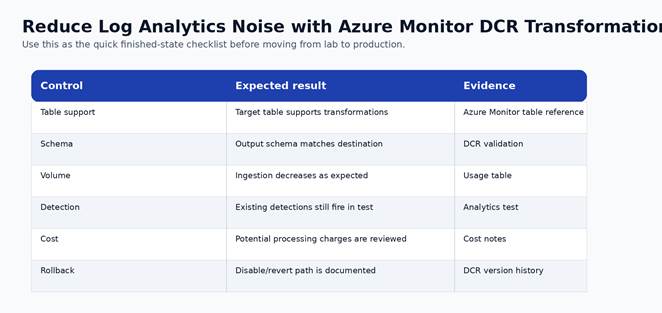
Figure 2. Finished-state validation chart for the completed build.
| Control | Expected result | Evidence to capture |
| Table support | Target table supports transformations | Azure Monitor table reference |
| Schema | Output schema matches destination | DCR validation |
| Volume | Ingestion decreases as expected | Usage table |
| Detection | Existing detections still fire in test | Analytics test |
| Cost | Potential processing charges are reviewed | Cost notes |
| Rollback | Disable/revert path is documented | DCR version history |
Cost and licensing notes
Microsoft documents special cost behavior for transformations. For Analytics or Basic Logs, filtering more than 50 percent can create processing charges unless Microsoft Sentinel is enabled for the workspace. Auxiliary Logs charge for processing and ingestion differently.
Learn more about pricing: https://learn.microsoft.com/en-us/azure/azure-monitor/data-collection/data-collection-transformations#cost-for-transformations
Known limitations and edge cases
- KQL transformations are evaluated per incoming record and do not support all analytics patterns.
- Aggressive filtering can remove forensic evidence.
- Workspace transformation DCRs and AMA DCR transformations apply in different places.
Troubleshooting
- If the control does not appear enabled, re-check RBAC at the subscription and resource scope before changing the configuration again.
- If logs or recommendations do not appear immediately, confirm documented data latency before assuming the deployment failed.
- If a production dependency breaks, stop expansion, capture the failing path, and compare it against the before-state inventory.
- If an alert is noisy, tune scope and ownership first. Do not suppress security signals globally without a review record.
Rollback or cleanup
- For lab resources, remove the pilot association, policy assignment, connector, rule, or configuration after screenshots and validation are complete.
- For production resources, rollback should be a controlled change that restores the last known-good configuration and preserves audit evidence.
For irreversible settings, such as locked backup immutability, rollback is not available. Treat the approval step as the control point.