Many organizations know what APIs they intentionally publish through API Management, but they do not always know which APIs appear through function endpoints, Logic Apps, or cloud-native integration paths. API posture management helps close that inventory gap. In this walkthrough, we enable and use Defender CSPM API security posture signals to discover APIs across supported Azure services, review exposure and sensitivity findings, and turn the results into a remediation queue that infrastructure and application teams can actually work.
Goal: Use Defender CSPM API security posture management to discover API exposure across Azure services and prioritize risky APIs for remediation.
Why build this
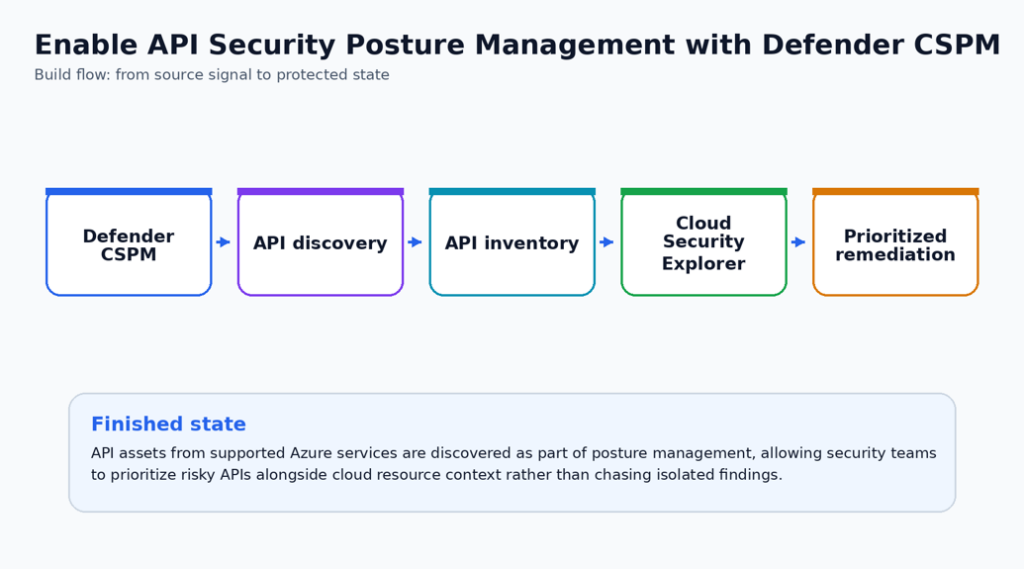
This build is valuable when API ownership is distributed across platform, integration, and application teams. The goal is not just discovery; it is to connect discovered API risk to owners, remediation steps, and repeatable review.
The workflow works best when API posture results are reviewed alongside cloud exposure, identity, and sensitivity context. That combination helps the team fix the APIs that matter most first.
Security outcome
- The team gains a central view of API exposure across supported Azure API surfaces.
- Risky APIs are prioritized using context such as external exposure, sensitive data, and related cloud risk.
- Remediation work is assigned to API owners with clear evidence rather than broad platform warnings.
What you will deploy or configure
- Defender CSPM configured with API posture visibility.
- API inventory review across supported Azure API surfaces.
- Cloud Security Explorer triage workflow.
- Prioritized remediation queue for exposed or unauthenticated APIs.
| Microsoft baseline: Use Defender CSPM as the posture source and keep runtime API protection separate. Defender for APIs protects APIs in API Management, while API security posture management helps inventory and prioritize API posture risks across supported resources. |
| Special Highlight: Add business criticality tags to API resources before the first review cycle. That makes Cloud Security Explorer and attack-path-style prioritization much more useful for remediation planning. |
Prerequisites
- Defender CSPM plan enabled.
- Read permissions across subscriptions that host API Management, Function Apps, Logic Apps, or related API endpoints.
- A tagging standard for environment, owner, data sensitivity, and business criticality.
Before-state checklist
Capture the before state first. This creates documentation that you and administrators can use to determine what has been changed, and helps with Change Approval Board (CAB) requests when you or your team are ready to move changes to production.
- Record the current plan, policy, connector, rule, identity, or workspace setting before making changes.
- Capture current access behavior or alert visibility so the final validation has a clear before/after comparison.
- Confirm the owner for the resource and the person who can approve rollback if the pilot exposes a dependency.
- Check whether existing logs, alerts, or recommendations already exist so the article does not confuse old data with new validation evidence.
Lab build
Choose one subscription with known Azure API Management, Function App, or Logic App API workloads. Start by discovering what Defender for Cloud already sees, then decide which findings should become engineering tasks.
The lab should produce three outcomes: an API inventory, a prioritized remediation queue, and a repeatable monthly review process.
Important: Function App and Logic App API posture support is currently preview and has tier limitations. Validate support for the workload type and region before using this as a production control, we will work through APIM (API Management in our example here).
Lab scenario
In this lab, use one pilot subscription that contains at least one known API surface. A good pilot target is a non-production API Management instance, a dedicated Function App, or a Standard Logic App with a clear owner. Avoid starting with production integrations that process regulated data unless the API owner can validate behavior immediately after remediation.
| Pilot item | Recommended starting point | What to record |
| Subscription | One subscription with known APIM, Function App, or Logic App assets | Subscription name, owner, environment, and whether Defender CSPM is enabled. |
| API asset | One low-risk API collection or endpoint group | Resource name, resource type, hosting tier, region, owner, and business criticality. |
| Known client path | One approved caller or test client | Expected authentication method, allowed network path, and backend dependency. |
| Review window | Same day or next business day after onboarding | Time when the API owner can validate behavior and review generated findings. |
Step 1 – Confirm Defender CSPM and API posture prerequisites
Open Microsoft Defender for Cloud > Environment settings and select the subscription that contains the API assets. Confirm that Defender CSPM is enabled.
Next, open the Defender CSPM settings and confirm that API security posture management is enabled. Microsoft documents that API posture management is part of Defender CSPM and that API onboarding can take a few hours after enablement. Mine took about 20 minutes in a testing environment, your mileage may vary!
Also confirm support for the resources in the pilot. API Management is supported in Premium, Standard, Basic, and Developer tiers, but self-hosted gateways and API Management workspaces are not supported for this posture feature. Supported App Service API posture coverage includes Function Apps on Premium, Elastic Premium, Dedicated App Service, and App Service Environment tiers. Logic Apps support is for Standard single-tenant and App Service Environment scenarios; Consumption tier Function Apps, Consumption tier Logic Apps, and Azure Arc-enabled Logic Apps are not supported.
| Prerequisite | How to verify | Expected result |
| Defender CSPM plan | Defender for Cloud > Environment settings > Subscription > Defender CSPM | Plan is enabled for the pilot subscription. |
| API posture extension | Open Defender CSPM settings | API security posture management is enabled and saved. |
| Permissions | Validate user role on subscription | Security Reader or higher for review; Owner or appropriate admin role for plan enablement. |
| Supported API asset | Review APIM, Function App, or Logic App tier | Resource type and hosting tier are supported for API posture onboarding. |
| Sensitive data discovery | Review Defender CSPM extension settings | Enable when the lab needs sensitive data exposure signals for APIs. |
Step 2 – Discover the API inventory that Defender sees
After the initial onboarding window, open Defender for Cloud and go to the API security dashboard or Inventory experience. Filter the API view to Defender CSPM so the lab focuses on posture management findings rather than workload protection coverage. Record the number of API collections, endpoints, and API operations Defender has discovered.
Group the results by exposure, authentication status, data sensitivity, and owner. The objective is not to fix everything in this step; it is to understand whether Defender sees the same API surface that the application and platform teams believe exists.
| Inventory field | Question to answer | Why it matters |
| Exposure | Is the API externally reachable or internal only? | Externally reachable APIs are usually reviewed first because they increase attack surface. |
| Authentication | Does the endpoint require authentication? | Unauthenticated endpoints should be treated as priority review items. |
| Sensitive data | Does Defender identify sensitive information in URL paths, query strings, request bodies, or responses? | Sensitive data context changes the remediation priority. |
| Owner | Which team owns the API and backend authorization? | Findings without owners usually become stale recommendations. |
| Backend dependency | What compute, data store, or workflow does the API reach? | Backend context helps determine operational impact before remediation. |
Step 3 – Normalize ownership and criticality before prioritizing
Before creating engineering tasks, add or correct Azure resource tags for owner, application, environment, data classification, and business criticality. This is not just governance housekeeping. Tags make the Defender inventory and exported review results easier to route to the correct team.
Use your existing tagging standard if one exists. If the environment does not have a standard, use a minimal pilot tag set and document it in the change record.
| Tag | Example value | Usage in the lab |
| Owner | team-platform-api | Routes remediation tasks and monthly review actions. |
| Application | payments-api | Groups endpoints that belong to the same application boundary. |
| Environment | dev, test, prod | Prevents test findings from being mixed with production risk. |
| DataClassification | public, internal, confidential, regulated | Raises priority when sensitive data exposure is present. |
| Criticality | low, medium, high, mission-critical | Helps sort findings when multiple exposed APIs exist. |
Step 4 – Use Cloud Security Explorer to find the riskiest API patterns
Open Microsoft Defender for Cloud > Cloud Security Explorer. Start with an API-related built-in query template if available, then adjust the filters to match your pilot. Focus on APIs that combine external reachability, weak or missing authentication, sensitive data indicators, vulnerable backend resources, risky identity assignments, or links to business-critical workloads.
Run at least three searches during the lab: externally reachable APIs, APIs with authentication concerns, and APIs with sensitive data context. Export the results to CSV or copy the query link for the evidence package. Cloud Security Explorer uses graph-based context, so the value is in relationships rather than a flat resource list.
| Explorer query focus | Example filter logic to reproduce in the portal | Engineering interpretation |
| Externally reachable APIs | API resources or endpoints with internet exposure context | Review network path, APIM policy, Function App access restrictions, and backend allow lists. |
| Unauthenticated or weakly authenticated APIs | API findings related to missing or weak authentication | Require authentication at the API layer and validate backend authorization. |
| Sensitive data exposure | API findings with sensitive information indicators | Reduce data returned by the API, mask responses, or change the API design. |
| Risky backend relationship | API endpoint connected to vulnerable compute, storage, or identity path | Fix the breakpoint that reduces the most attack-path risk. |
Step 5 – Build the remediation queue
Convert findings into engineering tasks only after grouping them by owner and confirming the likely control. The queue should not say “fix API security.” It should tell the owning team what to change and why that change matters.
Prioritize identity and exposure first. In most environments, the first queue should include requiring authentication, reducing public reachability, validating backend authorization, and removing unnecessary anonymous or broad access. If multiple findings affect the same API, create one engineering task that addresses the full control objective rather than separate tickets for every recommendation.
| Priority | Finding pattern | Preferred engineering task | Validation evidence |
| 1 | Externally reachable and unauthenticated API | Require authentication and restrict unauthenticated paths. | Unauthenticated request fails; authenticated test succeeds. |
| 2 | API exposes sensitive data in response or parameters | Reduce returned fields, mask data, or move sensitive data out of the URL/query path. | Repeat test call shows sensitive value no longer exposed. |
| 3 | Public API reaches sensitive backend | Validate backend authorization and narrow network path. | API caller cannot bypass intended authorization to reach backend data. |
| 4 | API has no owner or stale owner metadata | Apply owner and criticality tags and assign review accountability. | Inventory exports show owner and criticality populated. |
Step 6 – Remediate one high-value API control
Pick one finding that can be remediated safely in the pilot. A strong first remediation is to require authentication on a non-production API operation, restrict public reachability for a Function App using access restrictions, or update an API Management policy so that calls without the required token are rejected before they reach the backend.
Validate the control from both an approved path and an unapproved path. This is the step that makes the lab useful: the article should show that the risky path was not only identified, but actually reduced.
| Test | Command or action | Expected result |
| Approved caller | Call the API using the expected identity, token, or network path. | Request succeeds and application owner confirms expected behavior. |
| Unauthenticated caller | Call the API without the required credential or token. | Request fails with an appropriate unauthorized or forbidden response. |
| Unapproved location | Call from a network path that should not reach the API. | Request is blocked or fails before reaching the backend. |
| Backend authorization | Attempt a call that should not access protected backend data. | Backend data is not returned unless the caller is authorized. |
Step 7 – Re-run inventory review after tagging and remediation
Return to API inventory, Recommendations, and Cloud Security Explorer after tagging and the first remediation. Do not expect every signal to update instantly; posture data can take time to refresh. Capture the current state and record whether the risk was removed, reduced, assigned, or still under investigation.
The goal is to produce a reliable before/after story: what Defender saw, what the engineering team changed, and what evidence proves the risky API path is now better controlled.
| Evidence item | Where to capture it | What good looks like |
| Updated owner context | API inventory or resource tags | Owner and criticality are visible for the pilot API resource. |
| Reduced exposure | Cloud Security Explorer or recommendation details | The riskiest exposure path is removed, reduced, or clearly assigned. |
| Authentication proof | Test call results or API gateway logs | Unauthenticated calls fail and approved calls succeed. |
| Task traceability | Work item or remediation task | Task includes resource, finding, owner, due date, and validation evidence. |
Step 8 – Create the monthly API posture review cadence
API posture drifts when new Function Apps, Logic Apps, or API Management APIs are added outside normal release gates. Create a monthly review that exports API inventory, reviews new external or unauthenticated APIs, checks APIs with sensitive data context, and confirms that new API resources have owner and criticality tags.
For production, use the monthly review to find drift and the change process to fix it. The review should identify candidates for remediation, but changes that affect authentication, network reachability, or backend authorization should still go through an approved change path.
| Monthly review item | Owner | Output |
| Export API inventory filtered to Defender CSPM | Cloud security team | CSV or dashboard snapshot for the review record. |
| Review new externally reachable APIs | Platform/API owners | Remediation tasks for unapproved exposure. |
| Review unauthenticated or weak-auth findings | Application owners | Authentication or authorization fixes. |
| Review sensitive data exposure findings | Application and data owners | Data minimization or masking tasks. |
| Check missing owner or criticality tags | Cloud governance team | Tagging cleanup tasks and policy follow-up. |
Move from pilot to production
Expand by workload class rather than by subscription-wide bulk action. Start with API Management APIs, then add Function Apps, then Logic Apps, or use a similar grouping that matches ownership in your organization. Each expansion wave should have a known owner list, supported resource inventory, expected remediation path, and rollback plan for changes that affect production behavior.
Change-window notes
- Schedule the pilot when an API owner can validate application behavior immediately after the change. Authentication and exposure changes can be technically correct but still break callers that were not documented.
- Keep the first production change intentionally narrow. A smaller verified API remediation is better than a broad rollout with uncertain application impact.
- Do not disable public reachability, require new authentication, or change backend authorization until the approved client path is documented and tested.
- Preserve the before-state evidence. If the recommendation takes time to refresh, the screenshots, test results, and work item become the proof that the control changed.
- For controls that can affect API traffic flow, authentication, backend authorization, or alert volume, pre-stage rollback steps in the change ticket.
Change-window notes
- Schedule the pilot when a resource owner can validate application behavior immediately after the change.
- Keep the first production change intentionally narrow. A smaller but verified rollout is better than a broad rollout with uncertain impact.
- Do not remove the old control path until the new validation evidence is captured and reviewed.
- For controls that can affect traffic flow, authentication, backup retention, or alert volume, pre-stage the rollback steps in the change ticket.
Some Validations to Use
Use the following block as a starting point for validation or implementation. Replace names, scopes, and resource identifiers before using it in production.
// Cloud Security Explorer workflow to reproduce in the portal
// 1. Start with API resources or API findings.
// 2. Filter for internet exposure or missing authentication.
// 3. Add sensitive data or business criticality context.
// 4. Export the affected resources into a remediation queue.
Production hardening
For production, make API posture review part of the monthly cloud-security governance cadence. Treat unauthenticated, internet-exposed, or sensitive APIs as high-priority findings until an owner accepts or remediates the risk.
- Treat this control as part of the normal security operations backlog, not as a one-time portal configuration. Assign a named owner and review cadence before wider rollout.
- Use tags or a documented inventory to identify owner, environment, data sensitivity, and business criticality before expanding beyond the pilot.
- Separate deployment permission from approval permission. Security controls are stronger when one identity cannot both weaken and approve the control.
- Send logs, alerts, or audit evidence to the existing SOC workflow instead of creating a new place that nobody checks.
- Create an exception process with owner, expiry date, business justification, and compensating controls.
- Add the configuration to your normal change-management and monthly control-review process.
Operational handoff
- Add the new control to the monthly security review or platform operations checklist.
- Record the expected alert owner, escalation path, and response time for findings created by the control.
- Store the validation query, screenshot checklist, and rollback notes with the service runbook.
- Review exceptions quarterly and remove any exception that no longer has a business owner or expiry date.
[Screenshot placeholder: Add a screenshot showing the prioritized API finding queue or reduced risky API count after remediation.]
Finished-state validation
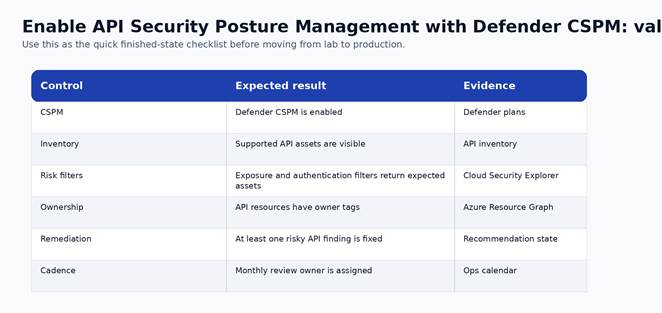
Figure 2. Finished-state validation chart for the completed build.
| Control | Expected result | Evidence to capture |
| CSPM | Defender CSPM is enabled | Defender plans |
| Inventory | Supported API assets are visible | API inventory |
| Risk filters | Exposure and authentication filters return expected assets | Cloud Security Explorer |
| Ownership | API resources have owner tags | Azure Resource Graph |
| Remediation | At least one risky API finding is fixed | Recommendation state |
| Cadence | Monthly review owner is assigned | Ops calendar |
Cost and licensing notes
Defender CSPM is a paid plan. The improvement is governance-oriented: use it to reduce duplicate manual discovery and prioritize the highest-risk API issues first.
Cost can vary by number of monthly calls to your API or APIs, be sure to validate your costing as you go through this exercise.
Known limitations and edge cases
- Posture management is not a replacement for runtime API protection or API gateway policy.
- Resource coverage depends on supported API surfaces and cloud account onboarding.
- Findings still require application owner validation before remediation.
Troubleshooting
- If the control does not appear enabled, re-check RBAC at the subscription and resource scope before changing the configuration again.
- If logs or recommendations do not appear immediately, confirm documented data latency before assuming the deployment failed.
- If a production dependency breaks, stop expansion, capture the failing path, and compare it against the before-state inventory.
- If an alert is noisy, tune scope and ownership first. Do not suppress security signals globally without a review record.
Rollback or cleanup
- For lab resources, remove the pilot association, policy assignment, connector, rule, or configuration after screenshots and validation are complete.
- For production resources, rollback should be a controlled change that restores the last known-good configuration and preserves audit evidence.
- For irreversible settings, such as locked backup immutability, rollback is not available. Treat the approval step as the control point.