
APIs often expose business logic directly to users, partners, mobile apps, and automation. When an API lacks authentication, exposes sensitive data, or carries unused legacy routes, the risk is not just infrastructure exposure; it is application behavior exposed through a managed gateway.
This article walks through a controlled Defender for APIs onboarding using Azure API Management. We inventory APIs, select a pilot group, enable the plan, monitor capacity, validate Defender recommendations, and define how findings should be triaged before broader rollout.
Goal: Onboard selected Azure API Management APIs to Microsoft Defender for APIs and validate posture insights, alert readiness, and operational ownership.
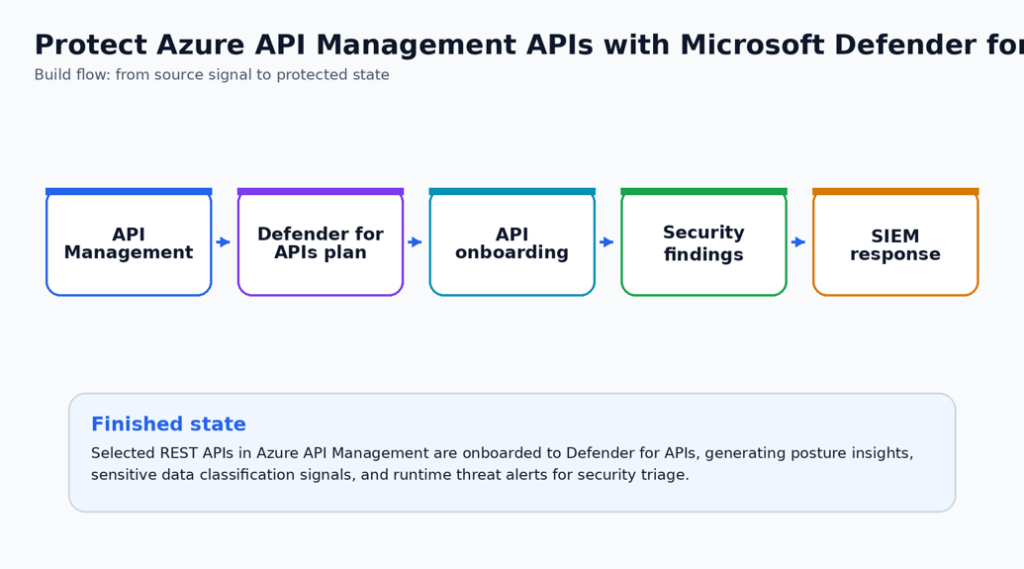
Why build this
Defender for APIs is most useful when API Management already publishes external or sensitive APIs and the platform team needs security findings without adding another appliance in front of the gateway. The key is to onboard deliberately rather than turning on visibility without an owner for the findings.
The pilot for this should include one external API, one internal or partner API, and one lower-risk API. That mix gives the team enough signal to validate posture recommendations, sensitive-data classification, and operational impact.
Security outcome
- API owners get a prioritized list of security findings tied to managed APIs instead of relying only on gateway configuration reviews.
- The platform team validates APIM capacity and performance during onboarding before expanding coverage.
- Findings are routed to a named owner with a triage category such as authentication, exposure, sensitive data, or deprecated API.
What is needed to Deploy & Configure
- Defender for APIs enabled for the subscription.
- A controlled onboarding group for APIs in API Management.
- Capacity monitoring during onboarding.
- Validation of recommendations, security insights, and alert readiness.
| Microsoft baseline: Onboard APIs in phases. Microsoft warns that onboarding APIs can increase compute, memory, and network utilization of the API Management instance, so gradual onboarding with capacity monitoring is the safe baseline. |
| Special Highlight: Use an API criticality label in your API inventory before onboarding. Start with internet-facing, unauthenticated, sensitive-data, and high-volume APIs so security effort follows risk. |
Prerequisites
- API Management instance with one or more supported REST APIs.
- Contributor or Owner rights on the subscription, resource group, or API Management instance.
- Defender for APIs plan availability and licensing approval.
- API Management capacity metric access for rollout monitoring.
Before-state checklist
Capture the before state first. This creates documentation that you and administrators can use to determine what has been changed, and helps with Change Approval Board (CAB) requests when you or your team are ready to move changes to production.
- Record the current plan, policy, connector, rule, identity, or workspace setting before making changes.
- Capture current access behavior or alert visibility so the final validation has a clear before/after comparison.
- Confirm the owner for the resource and the person who can approve rollback if the pilot exposes a dependency.
- Check whether existing logs, alerts, or recommendations already exist so the article does not confuse old data with new validation evidence.
Lab build
Start with a small set of APIs inside one API Management instance. Do not onboard every API in a busy production gateway until capacity, latency, and error-rate baselines have been captured.
- Open the API Management instance and review the API inventory. Identify external, unused, unauthenticated, and sensitive APIs before enabling protection.
- From the API Management resource, select Defender for Cloud under Security and enable the Defender for APIs plan for the subscription.
- Do not onboard every API at once in a busy instance. Select a small representative set and monitor API Management capacity, latency, and error rates.
- Open the recommendation to onboard APIs to Defender for APIs. Review affected resources and use the Fix action for the selected pilot APIs.
- Wait for the first security insights. Microsoft documents that first insights can take about 30 minutes, with refreshes thereafter.
- Review recommendations and security alerts. Create an owner/action matrix for each finding: authentication gap, external exposure, sensitive data, or anomalous traffic.
Change-window notes
- Schedule the pilot when a resource owner can validate application behavior immediately after the change.
- Keep the first production change intentionally narrow. A smaller but verified rollout is better than a broad rollout with uncertain impact.
- Do not remove the old control path until the new validation evidence is captured and reviewed.
- For controls that can affect traffic flow, authentication, backup retention, or alert volume, pre-stage the rollback steps in the change ticket.
Use the following block as a starting point for validation or implementation. Replace names, scopes, and resource identifiers before using it in production.
# Monitor API Management capacity after onboardingAzureMetrics
| where ResourceProvider == "MICROSOFT.APIMANAGEMENT"
| where MetricName in ("Capacity", "Requests", "FailedRequests")
| summarize AvgValue=avg(Average), MaxValue=max(Maximum) by MetricName, bin(TimeGenerated, 15m)
| order by TimeGenerated descProduction hardening
In production, pair Defender for APIs findings with the API lifecycle process. Every exposed API should have a product owner, authentication decision, data classification, and deprecation path.
- Treat this control as part of the normal security operations backlog, not as a one-time portal configuration. Assign a named owner and review cadence before wider rollout.
- Use tags or a documented inventory to identify owner, environment, data sensitivity, and business criticality before expanding beyond the pilot.
- Separate deployment permission from approval permission. Security controls are stronger when one identity cannot both weaken and approve the control.
- Send logs, alerts, or audit evidence to the existing SOC workflow instead of creating a new place that nobody checks.
- Create an exception process with owner, expiry date, business justification, and compensating controls.
- Add the configuration to your normal change-management and monthly control-review process.
Operational handoff
- Add the new control to the monthly security review or platform operations checklist.
- Record the expected alert owner, escalation path, and response time for findings created by the control.
- Store the validation query, screenshot checklist, and rollback notes with the service runbook.
- Review exceptions quarterly and remove any exception that no longer has a business owner or expiry date.
Finished-state validation
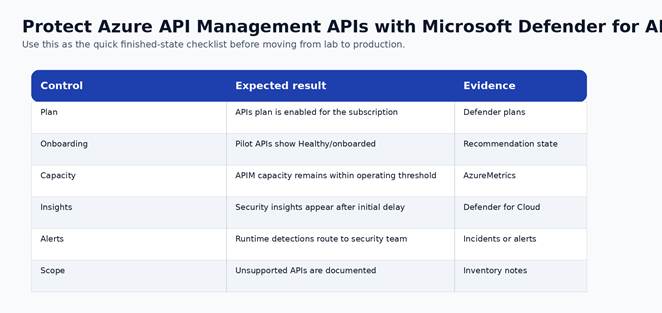
Figure 2. Finished-state validation chart for the completed build.
| Control | Expected result | Evidence to capture |
| Plan | APIs plan is enabled for the subscription | Defender plans |
| Onboarding | Pilot APIs show Healthy/onboarded | Recommendation state |
| Capacity | APIM capacity remains within operating threshold | AzureMetrics |
| Insights | Security insights appear after initial delay | Defender for Cloud |
| Alerts | Runtime detections route to security team | Incidents or alerts |
| Scope | Unsupported APIs are documented | Inventory notes |
Cost and licensing notes
Defender for APIs is licensed through Defender for Cloud. Plan for subscription-level enablement and validate API Management resource utilization during rollout because security processing can add load. Check your PoC / Testing, and Production tenants to ensure you validate your own costs for region and other specifics.
Known limitations and edge cases
- Currently focused on REST APIs in API Management.
- APIs exposed through self-hosted gateway or workspaces have documented limitations.
- First insights are not immediate; build the validation window into the rollout.
Troubleshooting
- If the control does not appear enabled, re-check RBAC at the subscription and resource scope before changing the configuration again.
- If logs or recommendations do not appear immediately, confirm documented data latency before assuming the deployment failed.
- If a production dependency breaks, stop expansion, capture the failing path, and compare it against the before-state inventory.
- If an alert is noisy, tune scope and ownership first. Do not suppress security signals globally without a review record.
Rollback or cleanup
- For lab resources, remove the pilot association, policy assignment, connector, rule, or configuration after screenshots and validation are complete.
- For production resources, rollback should be a controlled change that restores the last known-good configuration and preserves audit evidence.
For irreversible settings, such as locked backup immutability, rollback is not available. Treat the approval step as the control point.